Laravel PDF generation: DomPDF vs Browsershot vs Gotenberg vs Cloudflare vs BladePDF
See how five Laravel PDF renderers handle real Blade invoices, modern CSS, JavaScript, local assets, concurrency, memory and operational ownership.

On this page
Choosing a Laravel PDF renderer is not a one-dimensional speed contest. A renderer can be exceptionally fast and still be the wrong choice if it cannot reproduce your CSS. Another can match Chrome perfectly but make your Laravel workers responsible for browser binaries, memory spikes, queues and recovery.
This benchmark compares DomPDF, Browsershot, Gotenberg, Cloudflare Browser Run Quick Actions and BladePDF with the same Laravel application and the same Blade fixtures. It measures latency and throughput, then separately reviews modern CSS, JavaScript, long documents and local assets. The raw observations, generated PDFs and benchmark code are public, so every conclusion can be challenged or reproduced.
By a wide margin, provided your document fits its HTML and CSS capabilities.
It delivered the lowest browser-backed p95 in both measured invoice fixtures.
Browser-quality output with the Laravel integration, asset pipeline and browser runtime managed outside your app.
Short answer: choose DomPDF for conservative documents where speed and local execution matter most; Browsershot for maximum browser control; Gotenberg for a self-hosted browser service boundary; Cloudflare when its managed Quick Actions model fits your application; and BladePDF when you want a Laravel-focused managed workflow without operating Chromium.
The result before the tables#
There is no honest universal winner. The useful result is the boundary each tool creates around your application.
DomPDF
Best for: receipts, labels and conventional invoices built with a conservative CSS subset.
It was the fastest renderer in every performance scenario, but failed the modern CSS, JavaScript chart, custom-font and chart-fidelity checks.
Browsershot
Best for: teams that need direct Puppeteer and Chromium control.
It produced the browser reference output and passed the fidelity suite, while the standard fresh-browser path carried the largest observable application-side memory footprint.
Gotenberg
Best for: teams that want Chromium isolated behind a service they still host.
It led the browser-backed sequential results and passed the browser-feature fixtures, but Docker, service capacity, telemetry and browser updates remain your responsibility.
Cloudflare
Best for: applications already comfortable with Browser Run Quick Actions and remotely reachable or embedded assets.
Modern CSS rendered correctly. The tested JavaScript readiness fixture failed, and concurrency-8 blocks returned HTTP 429 responses in this account and request pattern.
BladePDF
Best for: Laravel teams that want Chrome-quality output and local-asset handling without browser infrastructure.
It passed the browser-feature and JavaScript fixtures and remained competitive under concurrency, but it did not beat DomPDF or Gotenberg on raw sequential latency.
That last caveat matters. BladePDF is not presented here as the fastest renderer. Its value is the combination of fidelity, Laravel-native asset handling and a managed operational boundary.
What exactly was benchmarked#
The harness is a Laravel 13 application using spatie/laravel-pdf 2.12.0 where the driver supports it. The main performance run used PHP 8.4.1, Node.js 22.16.0, Puppeteer 25.5.0, Chrome 151.0.7922.71, DomPDF 3.1.6, Browsershot 5.4.0 and bladepdf/laravel 1.0.3.
The test set deliberately covers different failure modes:
- Simple invoice: tables, predictable page breaks and a portable PNG.
- Modern invoice: gradients, flexbox, CSS Grid, inline SVG and a custom font.
- Long report: ten pages, repeated table structure and a chart.
- JavaScript chart: a canvas chart plus a deterministic delayed-ready signal.
- Local assets: a local PNG, Vite-built CSS and a font stored outside the public directory.
You can inspect the actual Blade fixtures, benchmark commands and entire public repository. This is more useful than benchmarking a hard-coded one-line HTML string that never resembles a production document.
Performance environment#
Performance and capacity were measured from Hetzner in Nuremberg on Linux. The primary run used a CPX42 profile with 8 shared vCPU and approximately 16 GB RAM on Debian 12 x86_64. Local renderers ran on that host; BladePDF and Cloudflare were reached over the network. Provider-side CPU and RAM were not observable for either managed service.
The sequential scenario rendered each fixture 50 times. Capacity scenarios submitted 100 attempts at each configured concurrency. Latency percentiles include successful renders only, so every table also shows the success count. A single named “first request” observation exists in the raw data but is intentionally not treated as a cold-start distribution.
Fidelity environment#
Fidelity came from a separate replacement run on August 15, 2026 using a pinned Linux x86_64 Docker environment on a local Docker Desktop host. It used bladepdf/laravel 1.0.4 after a local-asset MIME handling fix. That run is marked as unmeasured and is used only for screenshots, PDFs and manual Pass/Partial/Fail review—never for performance numbers.
Keeping the environments separate avoids a tempting but invalid shortcut: merging screenshots from one run with latency samples from a different host and pretending they form a single measurement.
Sequential performance: simple invoice#
The simple invoice favors renderers that can process conventional HTML and tables with little setup.
| Renderer | Success | p50 | p95 | p99 | Throughput |
|---|---|---|---|---|---|
| DomPDF | 50/50 | 138 ms | 149 ms | 163 ms | 7.17 docs/s |
| Gotenberg | 50/50 | 173 ms | 201 ms | 242 ms | 5.62 docs/s |
| BladePDF | 50/50 | 338 ms | 409 ms | 435 ms | 2.85 docs/s |
| Cloudflare | 50/50 | 365 ms | 506 ms | 714 ms | 2.60 docs/s |
| Browsershot | 50/50 | 460 ms | 508 ms | 514 ms | 2.17 docs/s |
DomPDF’s p95 was 26% lower than Gotenberg’s and 64% lower than BladePDF’s for this fixture. If your PDFs are conventional and you have verified every layout requirement, that advantage is real—not something a browser-backed service should explain away.
Among browser-backed options, Gotenberg led. BladePDF’s p95 was lower than Browsershot’s by about 19%, while Cloudflare and Browsershot were nearly equal at p95 but showed different tail behavior at p99.
Sequential performance: modern invoice#
The modern invoice adds CSS features that expose the difference between a PDF layout engine and an actual browser.
| Renderer | Success | p50 | p95 | p99 | Throughput |
|---|---|---|---|---|---|
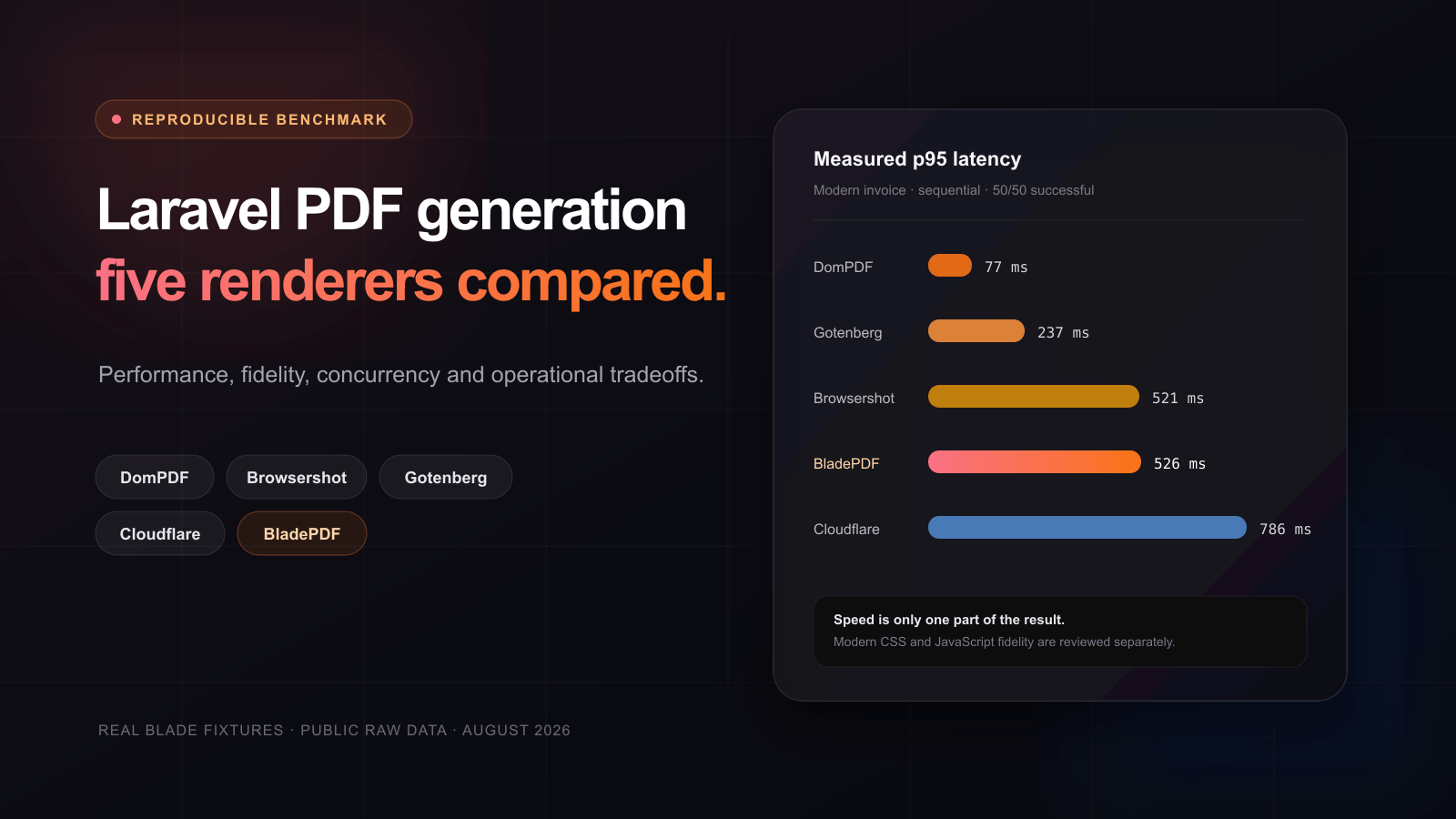
| DomPDF | 50/50 | 68 ms | 77 ms | 101 ms | 14.36 docs/s |
| Gotenberg | 50/50 | 199 ms | 237 ms | 279 ms | 4.93 docs/s |
| Browsershot | 50/50 | 478 ms | 521 ms | 537 ms | 2.12 docs/s |
| BladePDF | 50/50 | 458 ms | 526 ms | 594 ms | 2.14 docs/s |
| Cloudflare | 50/50 | 522 ms | 786 ms | 1,118 ms | 1.79 docs/s |
The DomPDF number cannot be read without the output: it rendered quickly, but the same document failed the gradient/flexbox, CSS Grid, inline SVG and custom-font review. A fast incorrect document is still useful evidence—it tells you exactly when DomPDF stops being the right tradeoff.
Gotenberg again had the best browser-backed sequential p95. Browsershot and BladePDF were effectively adjacent in this run: Browsershot was 4 ms lower at p95, while BladePDF had slightly higher measured throughput. Cloudflare had the widest tail in this fixture.
What the PDFs actually looked like#
Browsershot is used as the visual reference because it directly controls the benchmark’s pinned Chrome. It is a comparison target, not an assertion that every pixel difference is automatically wrong; the manual review uses the fixture’s explicit expectations.
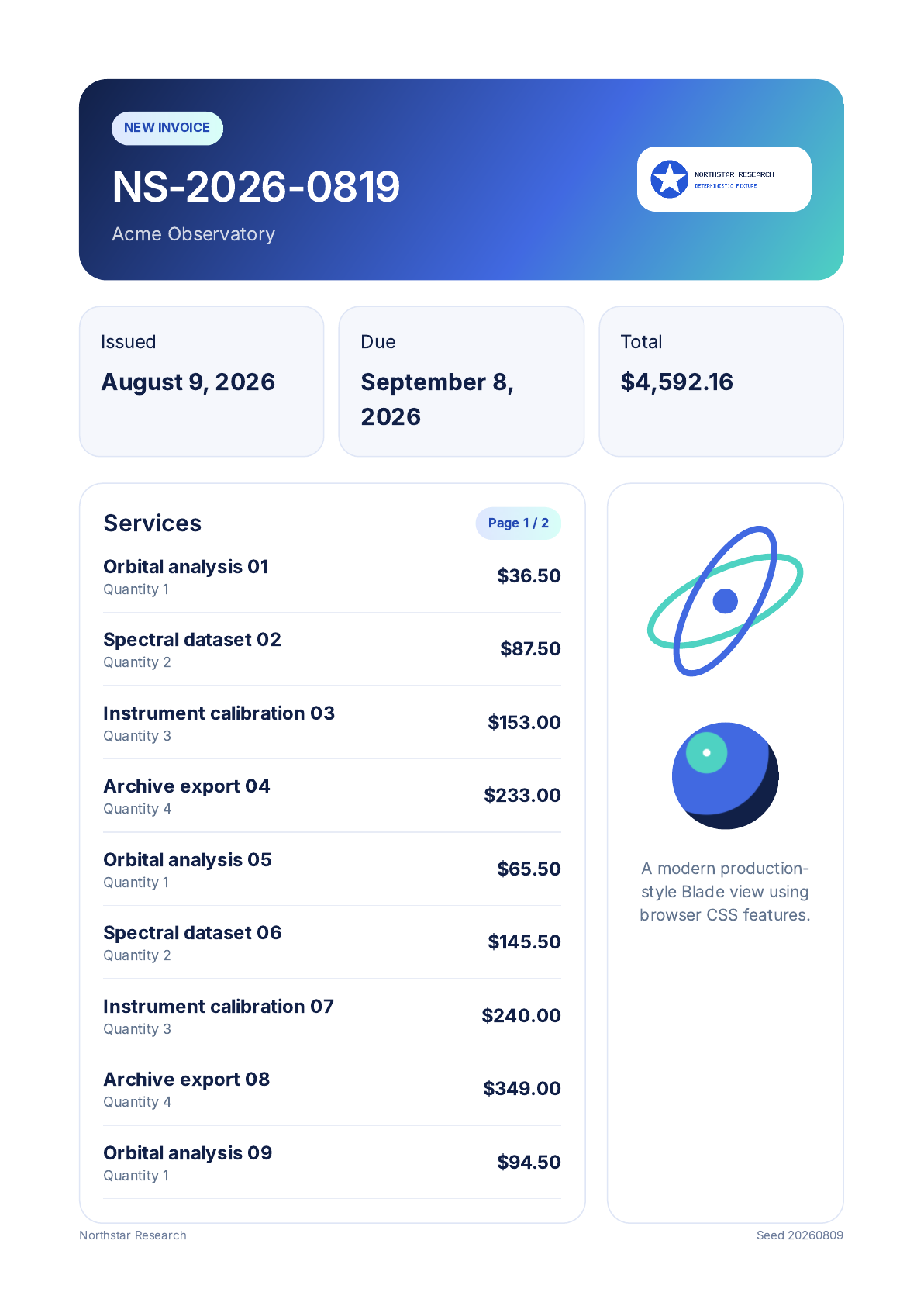
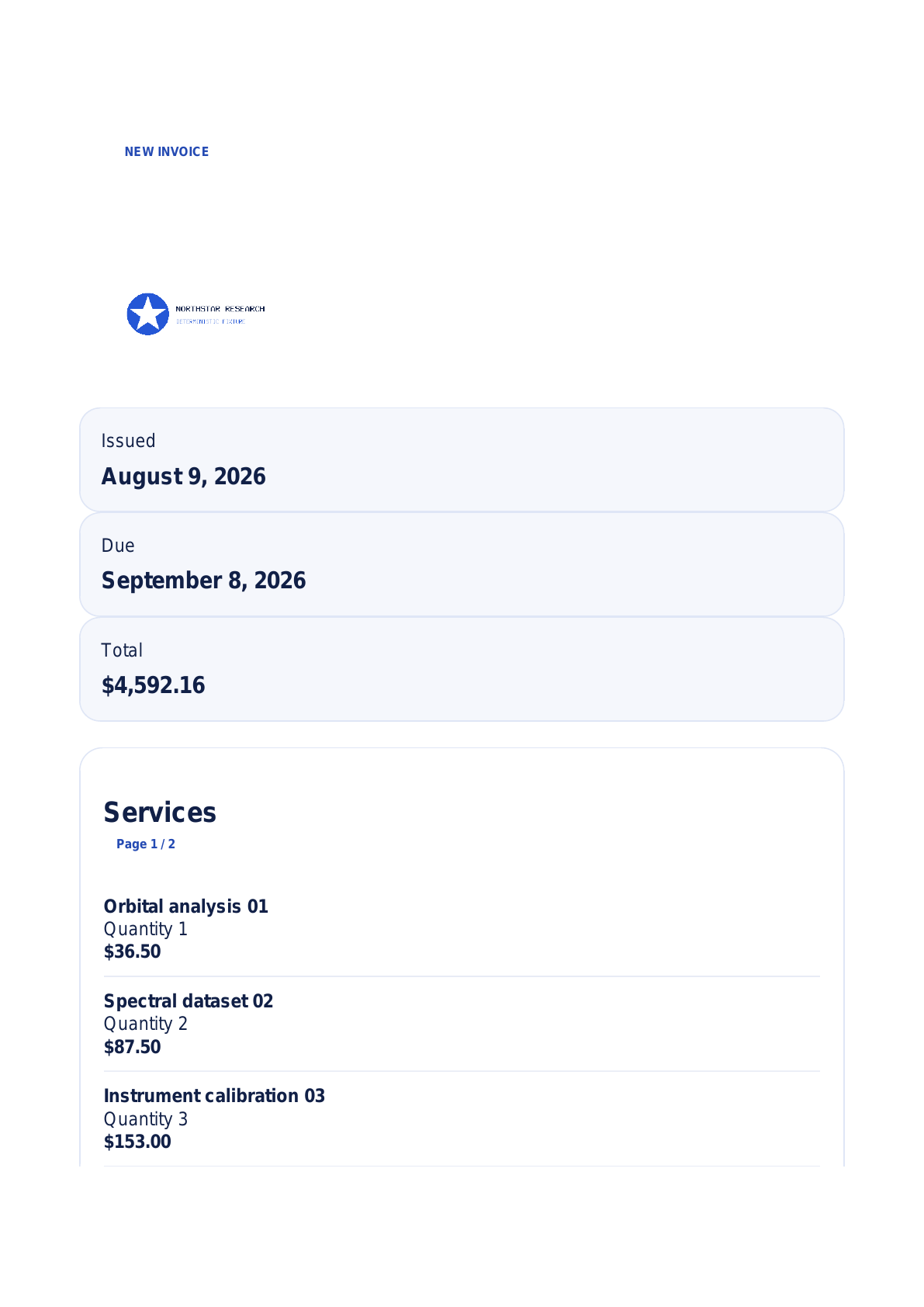
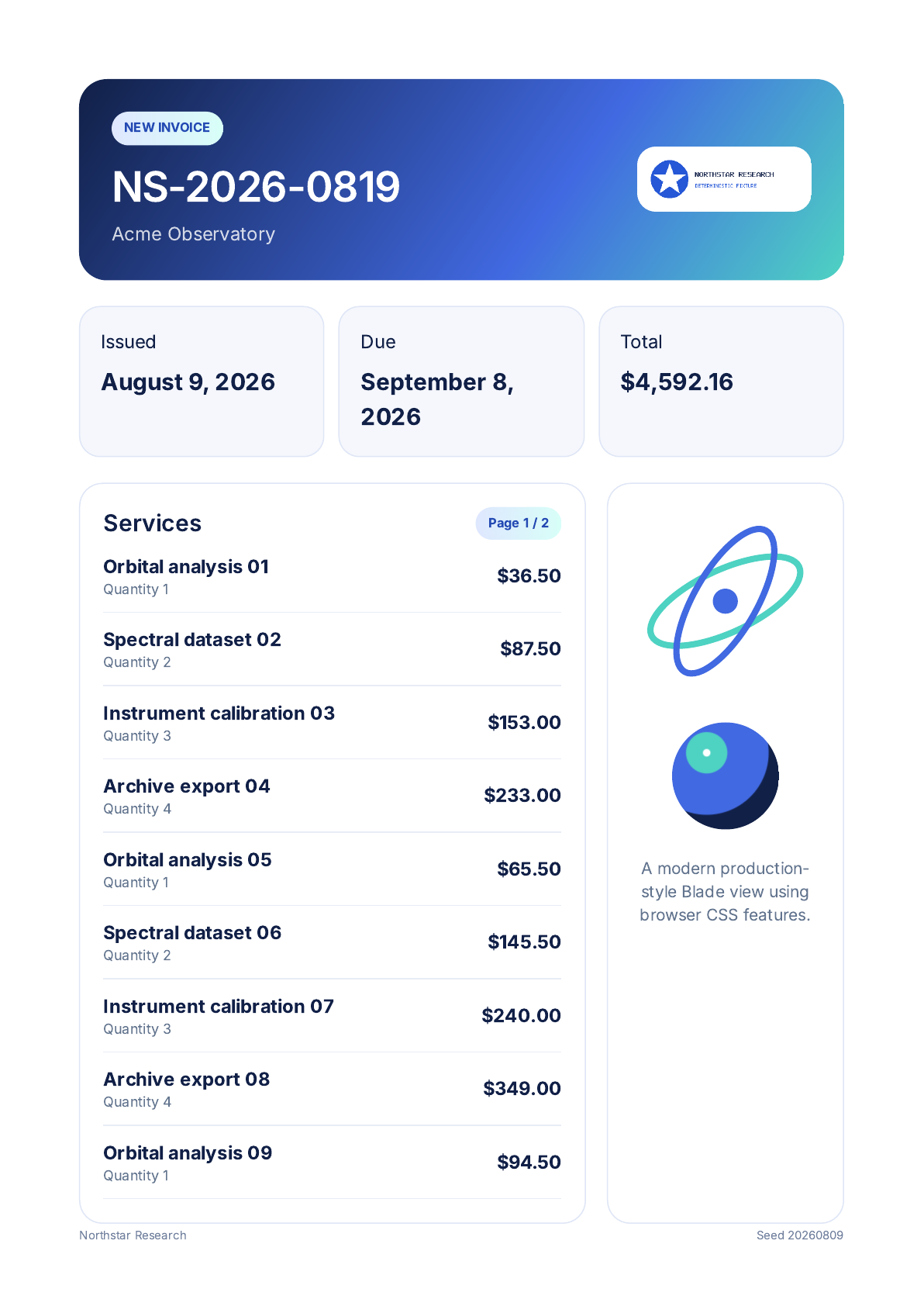
These screenshots come only from the replacement fidelity run. Open an image for its full resolution, or download the original PDFs later in this article.
Fidelity matrix: Pass, Partial or Fail#
The review intentionally avoids a made-up numeric score. A JavaScript chart may be essential for one application and irrelevant to another, so the individual outcomes are more useful than a weighted total.
| Fixture expectation | DomPDF | Browsershot | Gotenberg | Cloudflare | BladePDF |
|---|---|---|---|---|---|
| Simple table layout | Partial | Pass | Pass | Pass | Pass |
| Simple page break + PNG | Pass | Pass | Pass | Pass | Pass |
| Modern gradient/flexbox | Fail | Pass | Pass | Pass | Pass |
| Modern CSS Grid | Fail | Pass | Pass | Pass | Pass |
| Inline SVG + custom font | Fail | Pass | Pass | Pass | Pass |
| Ten-page report + long table | Pass | Pass | Pass | Pass | Pass |
| Long-report chart | Fail | Pass | Pass | Pass | Pass |
| JavaScript canvas chart | Fail | Pass | Pass | Fail | Pass |
| Delayed-ready content | Fail | Pass | Pass | Fail | Pass |
Cloudflare successfully rendered the modern CSS invoice, but its Quick Actions path did not satisfy this fixture’s deterministic JavaScript-ready contract. The captured document remained on the waiting state with an empty chart. That is a result for this endpoint, configuration and test—not a claim that Cloudflare can never execute JavaScript.
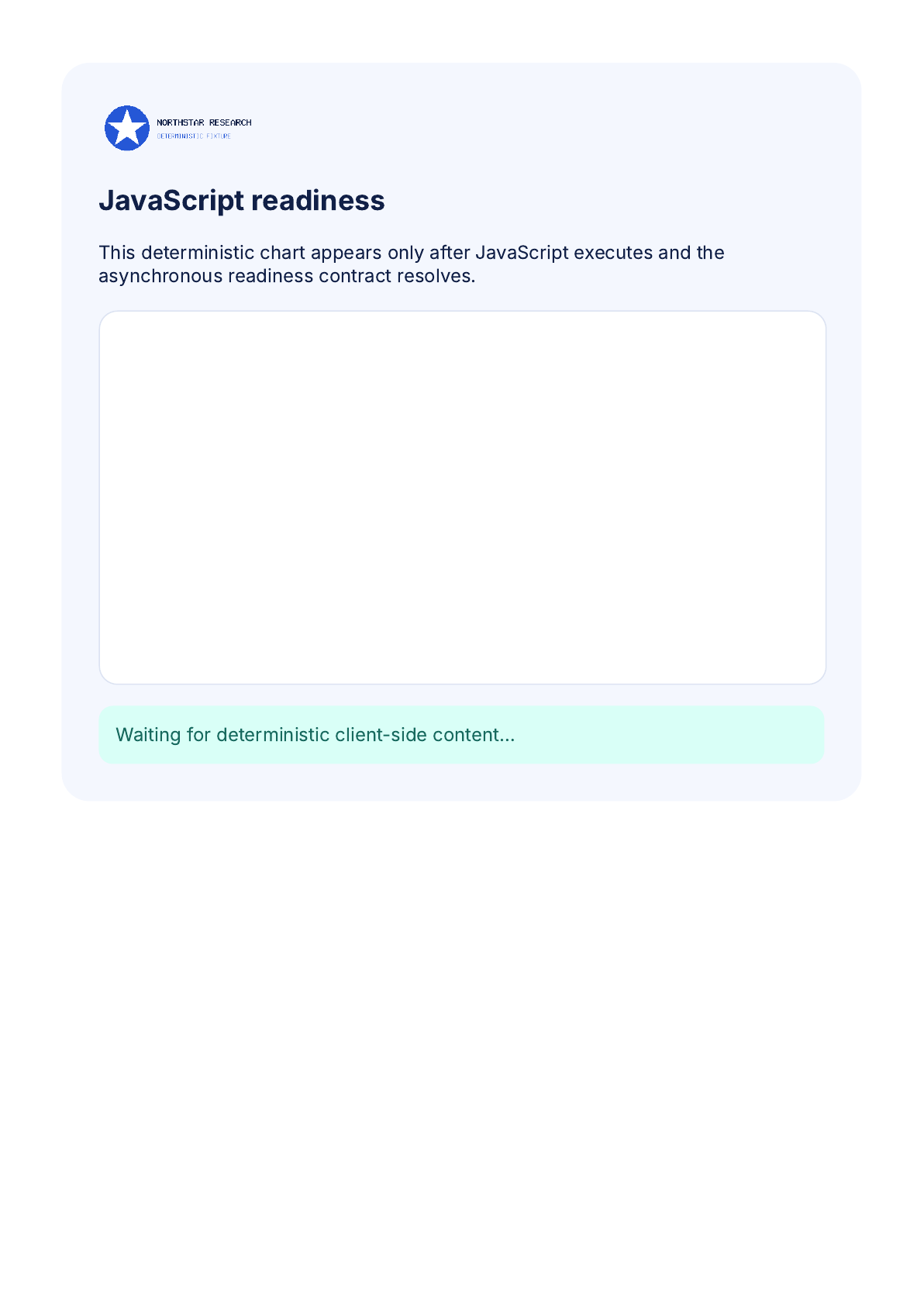
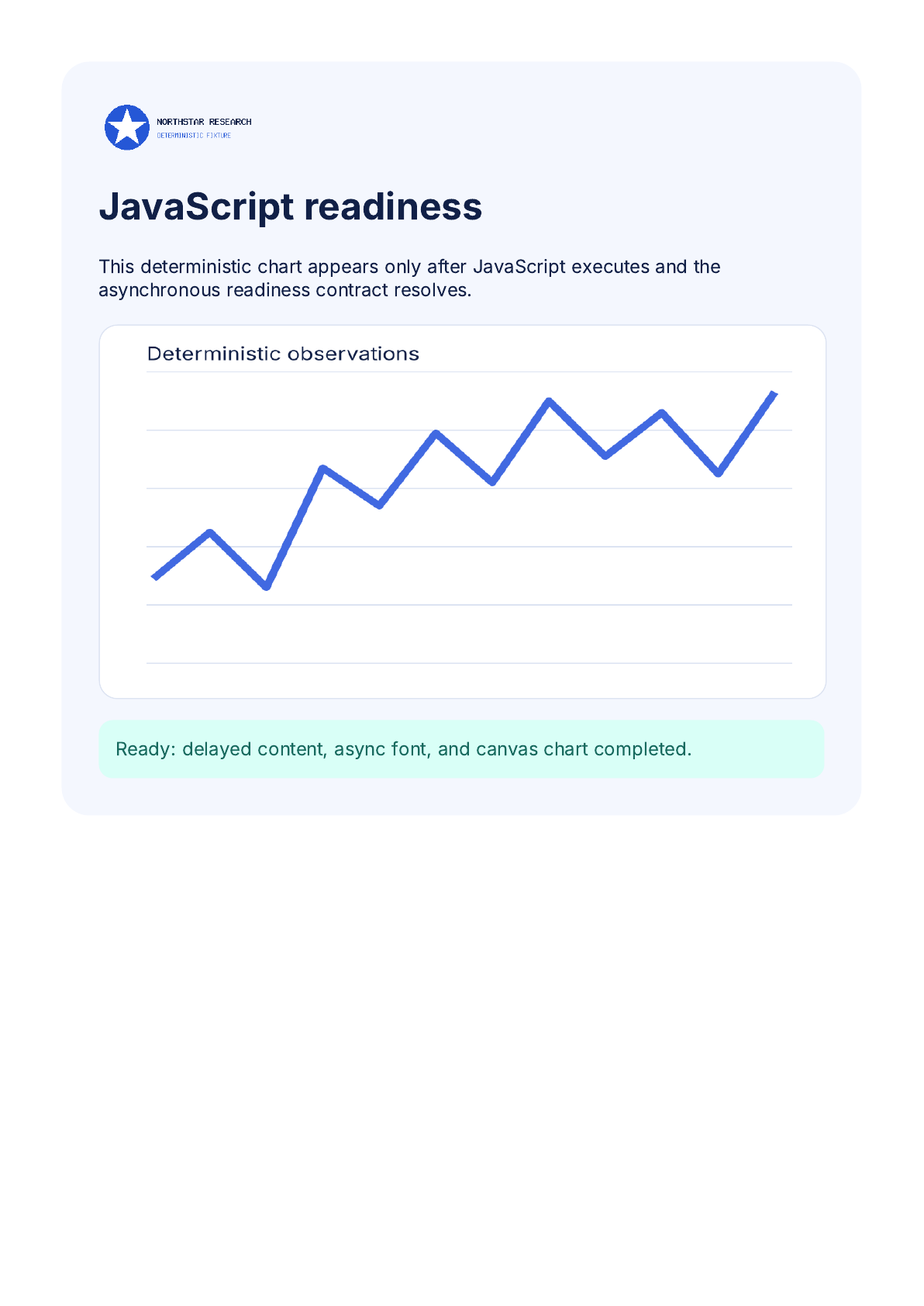
You can also download the original Cloudflare JavaScript PDF and BladePDF JavaScript PDF captured in that review run.
Local images, Vite CSS and fonts#
Local assets are one of the largest differences between an integration that works in a demo and one that survives production. A remote renderer cannot read /var/www/app/storage/logo.png just because the Blade view can.
The benchmark therefore tested two asset modes:
- Native path: the template uses the natural Laravel-local reference.
- Documented remediation: the integration applies the renderer’s documented way to embed, upload or expose the asset.
Browsershot passed the local PNG, Vite CSS and storage-font expectations in both modes. In native-path mode, DomPDF and BladePDF passed the PNG and Vite CSS but missed the storage font; Gotenberg and Cloudflare missed all three. With documented remediation, Browsershot, Gotenberg, Cloudflare and BladePDF passed the full set. DomPDF still missed the storage font in this fixture.
That result should influence migration estimates. “Supports local assets” is not a single yes/no capability; it depends on whether your application uses public URLs, data URIs, file access, multipart uploads or a request-scoped asset pipeline.
Concurrency: what happened at eight parallel requests#
The capacity runs used 100 attempts per renderer and fixture. The self-hosted renderers ran on CPX42; BladePDF used the Scale plan’s declared concurrency of eight; Cloudflare used a Workers Paid Quick Actions account. These are separate runs and are shown side by side, not pooled into one sample.
Simple invoice at concurrency 8#
| Renderer | Success | p95 of successes | Successful throughput |
|---|---|---|---|
| DomPDF | 100/100 | 169 ms | 52.20 docs/s |
| Gotenberg | 100/100 | 684 ms | 16.97 docs/s |
| BladePDF Scale | 100/100 | 511 ms | 18.93 docs/s |
| Browsershot | 100/100 | 717 ms | 11.72 docs/s |
| Cloudflare Quick Actions | 41/100 | 508 ms | 11.51 successful docs/s |
Modern invoice at concurrency 8#
| Renderer | Success | p95 of successes | Successful throughput |
|---|---|---|---|
| DomPDF | 100/100 | 103 ms | 100.99 docs/s |
| Gotenberg | 100/100 | 576 ms | 15.93 docs/s |
| BladePDF Scale | 100/100 | 705 ms | 13.11 docs/s |
| Browsershot | 100/100 | 754 ms | 11.48 docs/s |
| Cloudflare Quick Actions | 52/100 | 657 ms | 9.57 successful docs/s |
Cloudflare’s missing requests were recorded as HTTP 429 responses: 59 failures for the simple fixture and 48 for the modern fixture. Its p95 therefore describes only the successful subset. The observation is scoped to the tested paid account, Nuremberg load generator, request pattern and date; it is not a universal Cloudflare concurrency limit. Cloudflare’s current documentation describes Quick Actions as rate-limited requests rather than a purchased browser-session concurrency tier.
The self-hosted capacity sweep also shows where adding workers stopped producing proportional throughput. On the modern invoice, standard Browsershot rose from 2.15 docs/s at concurrency 1 to 11.48 at concurrency 8, then stayed near 11.5 while p95 increased to 1.21 seconds at concurrency 12 and 1.72 seconds at concurrency 16. Gotenberg similarly flattened near 16 docs/s after concurrency 8. More workers beyond that point mostly bought queueing latency.
A persistent-Browsershot variant improved the modern concurrency-8 result to 14.45 docs/s with a 613 ms p95. It remains a secondary result because operating a persistent browser endpoint changes the architecture and failure modes; it is not the default Browsershot path.
Observable memory is not the same as total memory#
The representative table below uses the modern-invoice sequential block. It reports peak resident memory observable from the Laravel side and, for Gotenberg, the separate render service. CPU values are intentionally excluded because short-lived process sampling made them unsuitable for publication.
| Renderer | Laravel-side peak RSS | Separate render service | What is not visible |
|---|---|---|---|
| DomPDF | 75 MiB | — | Nothing external |
| Browsershot | 623 MiB | — | Chrome is included in the application process tree |
| Gotenberg | 80 MiB | 220 MiB | No additional provider |
| Cloudflare | 85 MiB | Managed externally | Provider CPU and RAM |
| BladePDF | 83 MiB | Managed externally | Provider CPU and RAM |
This is why a managed renderer’s low application-side RSS must not be described as low total resource consumption. The browser still consumes resources; they are simply outside the Laravel host and outside the benchmark’s visibility.
Operational ownership#
Installation syntax can make two integrations look equally simple while their production responsibility differs considerably.
| Renderer | Additional runtime | Browser updates | Queue/concurrency owner | Relative operational responsibility |
|---|---|---|---|---|
| DomPDF | None beyond PHP | Not applicable | Application | Low |
| Browsershot | Node.js + Chrome/Chromium | Application | Application | High |
| Gotenberg | Dockerized render service | Operator | Service/operator | High |
| Cloudflare | Managed Browser Run | Provider | Application/provider limits | Medium |
| BladePDF | Managed rendering API | Provider | Provider plan + application | Low |
“Low” does not mean zero. Every integration still needs application-level timeouts, idempotent jobs, user-visible failure behavior and monitoring. The distinction is whether your team also owns browser sandboxing, binary compatibility, restarts, scaling and security updates.
Direct price is only part of the cost#
Pricing changes, so treat this as a dated snapshot verified on August 15, 2026, excluding tax and engineering time:
- Sufficient existing Laravel or Docker capacity can have $0 incremental infrastructure cost, but that is not the same as free rendering; the jobs consume capacity and your team still operates the stack.
- The benchmark’s dedicated Hetzner profiles were $23.59/month for CPX22 and $82.59/month for CPX42, each including one $0.60 Primary IPv4. A server price is not a concurrency guarantee.
- Cloudflare Workers Paid has a $5/month minimum. Quick Actions include 10 browser hours per month and then cost $0.09 per additional browser hour, according to Cloudflare Browser Run pricing and Workers pricing.
- BladePDF is $12/month for Starter with one concurrent generation and $69/month for Scale with eight, with unlimited generations subject to fair use. The free plan provides 200 generations per month for evaluation.
The current Hetzner values are documented in its June 2026 price adjustment. The benchmark’s cost model keeps infrastructure, browser time and plan fees separate, but it cannot price your engineers’ time, incident load or data-residency requirements. Those often matter more than the smallest monthly bill.
Which Laravel PDF renderer should you choose?#
Choose DomPDF when the template can be deliberately simple#
DomPDF is the clear performance choice in this benchmark. Use it when local execution is valuable and your documents can stay within the CSS behavior you have explicitly tested. It is especially attractive for transactional documents with fixed tables and typography.
Do not choose it on latency alone and assume a browser-oriented Tailwind or application view will transfer unchanged. Build a representative fixture first.
Choose Browsershot when browser control is the requirement#
Browsershot gives you direct access to Puppeteer and Chrome behavior. That makes it the most flexible option for custom waits, browser flags, local/offline execution and unusual automation. The cost is operational ownership and, in the standard path measured here, a large Chrome-inclusive memory footprint.
It is the right answer when controlling the browser is part of your product or infrastructure strategy—not merely an accidental dependency of creating invoices.
Choose Gotenberg when you want a self-hosted service boundary#
Gotenberg moves Chromium out of the Laravel process tree and behind an HTTP service. It produced the fastest browser-backed sequential p95 in both invoice fixtures and strong fidelity results. You still own the Docker service, its queues, capacity, monitoring and upgrades.
That is a good compromise for teams with an established container platform, strict data locality and the appetite to operate the renderer centrally.
Choose Cloudflare when Quick Actions match the workflow#
Cloudflare removes browser hosting and priced the measured usage attractively. It rendered the portable invoice fixtures and modern CSS correctly. Before adopting it, reproduce your JavaScript readiness behavior, asset strategy and burst pattern. The HTTP 429 results in this benchmark make success counts as important as its successful-only latency.
Cloudflare may be compelling if Browser Run is already part of your platform and your PDFs fit its request model. The benchmark does not test full Puppeteer/Playwright Browser Sessions, so its conclusions should not be transferred to those APIs.
Choose BladePDF when Laravel integration and low browser operations matter#
BladePDF did not win raw sequential latency. It did pass the browser-fidelity fixtures, the documented local-asset remediation and the tested Scale concurrency without failures. Its main advantage is architectural: Laravel renders the Blade view, the package discovers and carries request-scoped local assets, and the managed service owns the isolated Chromium runtime.
That makes it a strong fit when PDFs are important to the product but browser infrastructure is not. You keep the Blade workflow and can use the familiar Spatie Laravel PDF API, while avoiding Node.js, Chrome and a render-service deployment inside your application environment.
Reproduce the benchmark instead of trusting the headline#
The strongest reason to publish the harness is that your documents matter more than these fixtures. Clone the repository, configure only the renderers you want to evaluate, and add the Blade view that has caused real production problems.
git clone https://github.com/bladepdf/laravel-pdf-benchmark.git
cd laravel-pdf-benchmark
composer install
php artisan benchmark:doctor
Start with the repository’s setup and safety notes. Benchmarking managed services can create billable usage, and an aggressive load test should never be aimed at infrastructure you do not own or have permission to test.
For a full audit trail, use these immutable published run directories:
- Main CPX42 performance run
- Self-hosted CPX42 capacity run
- BladePDF Scale capacity run
- Cloudflare Workers Paid capacity run
- Replacement fidelity run
Download the real benchmark outputs#
These are the original A4 PDFs from the replacement fidelity run. DomPDF’s modern invoice is four pages; the browser-backed outputs are two pages.
The machine-readable performance summary CSV and fidelity review JSON are also available directly. They are convenience copies; the public Git repository remains the canonical source with manifests and raw observations.
The practical conclusion is simple: benchmark the document you are actually shipping, inspect the PDF—not only the stopwatch—and price the operational boundary as carefully as the API call. If browser fidelity is required and running Chromium is not part of what makes your Laravel product valuable, a managed renderer is often the more useful trade.
Continue reading
Laravel Browsershot in production
See what it takes to run Browsershot reliably in production—from Chromium and Docker to queue capacity, memory, assets, security, and persistent browsers.
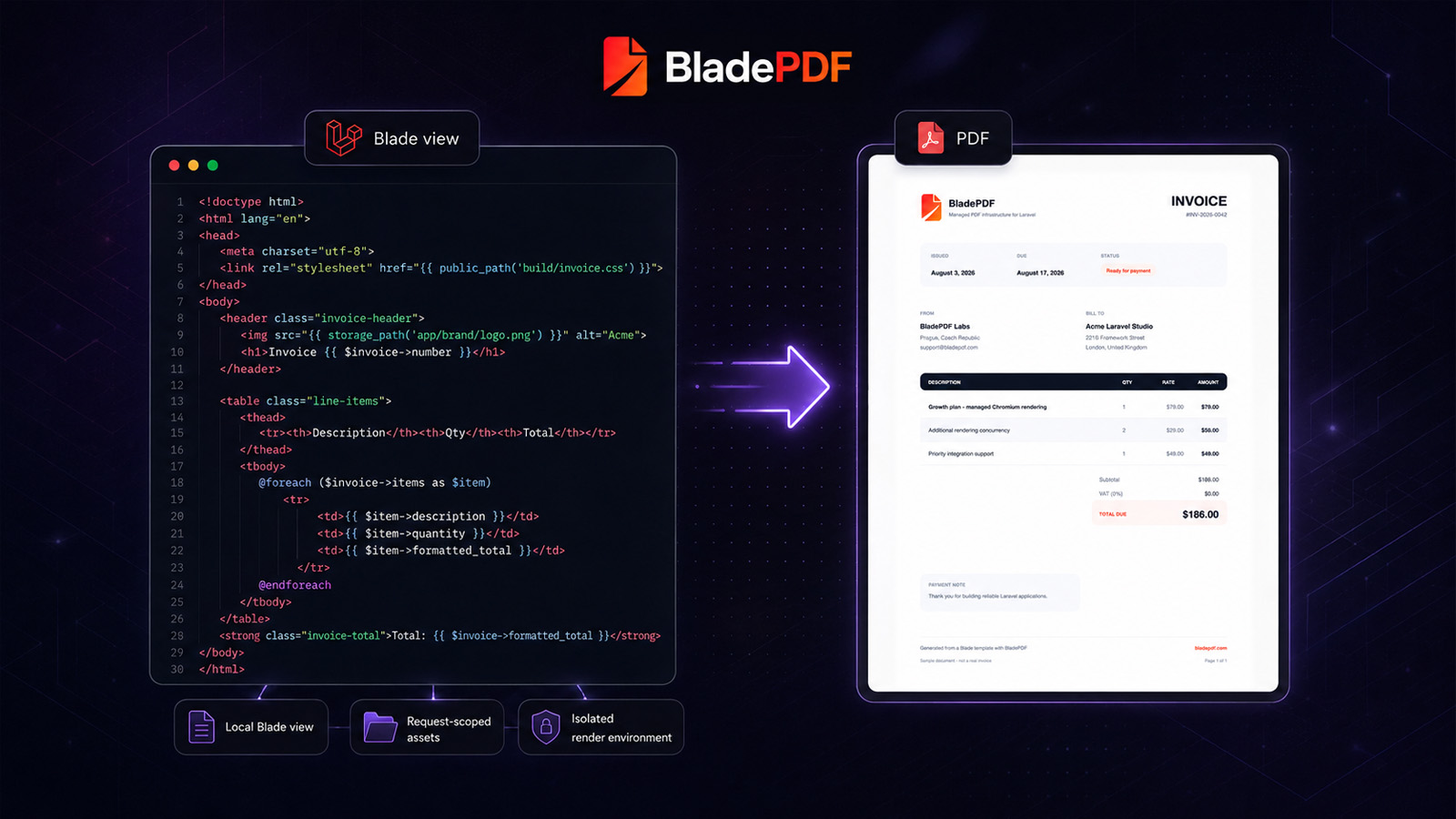
How to Generate PDFs from Laravel Blade Without Running Chromium
Build a production-ready invoice from an existing Blade view, understand how local assets reach the renderer, and decide when managed Chromium is the right tradeoff.
Generate PDFs in PHP with BladePDF
Turn a Twig invoice into a PDF, attach its CSS and logo, and return the binary response from plain PHP, Symfony or Slim. Download the Composer project and the PDF it generated.
Use browser-quality PDF rendering without operating the browser.
BladePDF renders existing Laravel Blade views, carries their local assets into an isolated Chromium environment, and starts with 200 generations per month for free.
Was this article helpful?
Your answer helps shape future technical guides.